
For directional drillers
The plan the office drew is the plan on your phone. Touchdown works the next stand with you and keeps the record.
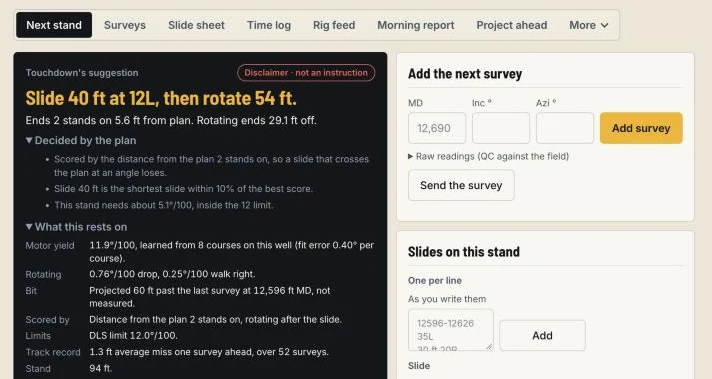
On the Drill screen
- 01
Next stand
A suggestion for the stand ahead, worked out from this well's own surveys and slides. Toolface in your words: HS, LS, 30R, 45L.
- 02
Surveys
Type them, paste them, or read them from a file, a PDF survey report included. A tie-in line when the surveys do not go back to surface.
- 03
Slide instruction
One short line for the driller, marked waiting, sent or seen. What you did with each suggestion is kept: followed, changed or not used.
- 04
Slide sheet
The slides and rotations for the well, kept as you go.
- 05
Project ahead
A projection to the bit, and where the hole is heading from here.
- 06
Plan vs actual
The surveys against the plan, on screen and on paper.
- 07
Morning report
Built from what is already in the well.
Advice, not orders. Touchdown's suggestions are calculations from the data you load. The directional driller and the operator decide what is drilled.
See it on one of your wells.
A demo takes 30 minutes. Tell us who you are and we will write back to set a time.
- 30 minutes, live
- Planner and directional driller screens
- No commitment
Sent.
Thank you. We will write to you at the email you gave.